一、什么是子主题?
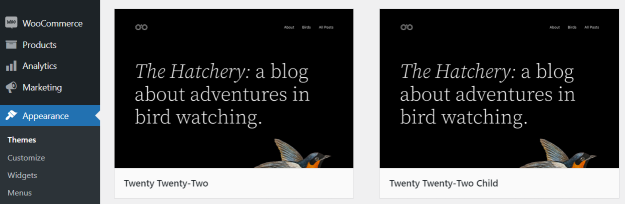
子主题 是一个继承父主题所有功能、样式和特性的独立 WordPress 主题。它允许您在不修改父主题核心文件的情况下,对主题进行自定义、扩展和覆盖。
核心概念:子主题依赖于父主题,没有父主题就无法工作。当您激活子主题时,WordPress 会先查找子主题中的文件,如果找不到,则使用父主题中的对应文件。
二、为什么要使用子主题?
主要优势:
- 安全更新父主题:可以随时更新父主题,而不会丢失自定义修改
- 便于维护:所有自定义代码都集中在一个地方
- 代码复用:继承父主题的所有功能,无需重复代码
- 快速还原:如果出现问题,只需停用子主题即可恢复原始状态
- 学习工具:理解 WordPress 主题结构和钩子系统的最佳方式
适用场景:
- ✓ 修改主题样式(CSS)
- ✓ 添加自定义功能
- ✓ 覆盖父主题模板文件
- ✓ 添加新的页面模板
- ✓ 修改主题功能文件
- ✓ 为商业主题进行二次开发
三、子主题的基本结构
最小化子主题结构:
your-child-theme/
│
├── style.css                 # 必须:子主题样式表
├── functions.php             # 可选:子主题功能文件
└── screenshot.png            # 可选:主题截图(1200×900px)
四、如何创建子主题(完整代码)
步骤1:创建子主题目录
在 /wp-content/themes/下创建新文件夹,例如:
/wp-content/themes/twentytwentyfour-child/步骤2:创建 style.css 文件
/*
Theme Name:   Twenty Twenty-Four Child
Theme URI:    https://example.com/twentytwentyfour-child/
Description:  Twenty Twenty-Four Child Theme
Author:       你的名字
Author URI:   https://example.com
Template:     twentytwentyfour
Version:      1.0.0
License:      GNU General Public License v2 or later
License URI:  http://www.gnu.org/licenses/gpl-2.0.html
Text Domain:  twentytwentyfour-child
*/

/* 注意:Template 必须与父主题文件夹名完全一致 */
步骤3:创建 functions.php 文件
<?php
/**
 * Twenty Twenty-Four Child Theme Functions
 */

// 1. 加载父主题样式表
add_action( 'wp_enqueue_scripts', 'twentytwentyfour_child_enqueue_styles' );
function twentytwentyfour_child_enqueue_styles() {
    // 加载父主题样式
    wp_enqueue_style(
        'parent-style',
        get_template_directory_uri() . '/style.css'
    );

    // 加载子主题样式(覆盖父主题样式)
    wp_enqueue_style(
        'child-style',
        get_stylesheet_directory_uri() . '/style.css',
        array( 'parent-style' ),
        wp_get_theme()->get('Version')
    );
}

// 2. 添加自定义功能
function twentytwentyfour_child_custom_function() {
    // 你的自定义代码
    echo '<p>来自子主题的自定义内容</p>';
}
add_action( 'wp_footer', 'twentytwentyfour_child_custom_function' );
?>
五、高级用法示例
1. 覆盖父主题模板文件
只需在子主题中创建同名文件即可覆盖。例如,要修改文章单页模板:
子主题文件结构:
twentytwentyfour-child/
├── style.css
├── functions.php
└── single.php    # 覆盖父主题的 single.php
示例:修改 single.php
<?php
/**
 * 子主题的单篇文章模板
 * 覆盖父主题的 single.php
 */
get_header();
?>

<div id="primary" class="content-area">
    <main id="main" class="site-main">
        <?php
        while ( have_posts() ) :
            the_post();

            // 添加自定义内容
            echo '<div class="custom-notice">本文来自子主题模板</div>';

            // 调用父主题的模板部分
            get_template_part( 'template-parts/content/content', 'single' );

            // 自定义相关文章
            if ( function_exists( 'twentytwentyfour_child_related_posts' ) ) {
                twentytwentyfour_child_related_posts();
            }

        endwhile;
        ?>
    </main>
</div>

<?php
get_footer();
2. 添加新页面模板
在子主题中创建新模板文件:
template-fullwidth.php
<?php
/**
 * Template Name: 全宽页面
 * Template Post Type: page, post
 */
get_header();
?>

<div class="full-width-container">
    <header class="page-header">
        <?php the_title( '<h1 class="page-title">', '</h1>' ); ?>
    </header>

    <div class="page-content">
        <?php
        while ( have_posts() ) :
            the_post();
            the_content();
        endwhile;
        ?>
    </div>
</div>

<?php
get_footer();
3. 扩展父主题功能文件
覆盖父主题的 functions.php 中的特定函数:
<?php
// 在子主题的 functions.php 中

// 如果父主题函数存在,先移除父主题的钩子
add_action( 'after_setup_theme', 'twentytwentyfour_child_remove_parent_function', 15 );
function twentytwentyfour_child_remove_parent_function() {
    // 移除父主题的某个功能
    remove_action( 'wp_footer', 'parent_theme_function_name' );
}

// 添加增强功能
function twentytwentyfour_child_enhance_theme() {
    // 添加新菜单位置
    register_nav_menus(
        array(
            'footer-menu' => __( '底部菜单', 'twentytwentyfour-child' ),
        )
    );

    // 添加主题支持
    add_theme_support( 'post-thumbnails' );
    add_theme_support( 'custom-logo' );
}
add_action( 'after_setup_theme', 'twentytwentyfour_child_enhance_theme' );

// 自定义小工具区域
function twentytwentyfour_child_widgets_init() {
    register_sidebar(
        array(
            'name'          => __( '侧边栏底部', 'twentytwentyfour-child' ),
            'id'            => 'sidebar-footer',
            'description'   => __( '侧边栏底部的小工具区域', 'twentytwentyfour-child' ),
            'before_widget' => '<section id="%1$s" class="widget %2$s">',
            'after_widget'  => '</section>',
            'before_title'  => '<h2 class="widget-title">',
            'after_title'   => '</h2>',
        )
    );
}
add_action( 'widgets_init', 'twentytwentyfour_child_widgets_init' );
?>
4. 添加自定义 CSS
在子主题的 style.css中添加:
/* 子主题样式表 */

/* 1. 覆盖父主题样式 */
.site-header {
    background-color: #2c3e50;
}

/* 2. 添加新样式 */
.custom-button {
    background: linear-gradient(135deg, #667eea 0%, #764ba2 100%);
    color: white;
    padding: 12px 24px;
    border-radius: 30px;
    border: none;
    cursor: pointer;
    transition: transform 0.3s ease;
}

.custom-button:hover {
    transform: translateY(-2px);
    box-shadow: 0 10px 20px rgba(0,0,0,0.1);
}

/* 3. 响应式设计 */
@media (max-width: 768px) {
    .site-header {
        padding: 10px 0;
    }

    .custom-button {
        width: 100%;
    }
}
5. 添加自定义 JavaScript
// 在 functions.php 中添加
function twentytwentyfour_child_scripts() {
    // 添加自定义 JavaScript
    wp_enqueue_script(
        'child-custom-js',
        get_stylesheet_directory_uri() . '/js/custom.js',
        array( 'jquery' ),
        '1.0.0',
        true
    );

    // 传递 PHP 变量到 JavaScript
    wp_localize_script( 'child-custom-js', 'childThemeVars', array(
        'ajax_url' => admin_url( 'admin-ajax.php' ),
        'nonce'    => wp_create_nonce( 'child_theme_nonce' ),
        'home_url' => home_url()
    ));
}
add_action( 'wp_enqueue_scripts', 'twentytwentyfour_child_scripts' );
六、最佳实践与注意事项
文件覆盖优先级:
- WordPress 首先在子主题中查找文件
- 如果找不到,再到父主题中查找
- 最后使用 WordPress 核心文件
可覆盖的常见文件:
style.css– 样式表functions.php– 功能文件(不会覆盖,而是额外加载)header.php– 头部模板footer.php– 页脚模板single.php– 单篇文章模板archive.php– 文章归档模板page.php– 页面模板404.php– 404页面模板- 任何模板文件
重要提示:
- functions.php 的特殊性:子主题的
functions.php不会覆盖父主题的,而是在父主题的之后加载 - 保持更新:定期检查父主题更新,确保兼容性
- 使用钩子:尽量使用 action/filter 钩子,而不是直接修改模板文件
- 创建备份:修改前备份子主题文件
- 使用文本域:正确加载翻译文件
// 加载翻译
function twentytwentyfour_child_setup() {
    load_child_theme_textdomain(
        'twentytwentyfour-child',
        get_stylesheet_directory() . '/languages'
    );
}
add_action( 'after_setup_theme', 'twentytwentyfour_child_setup' );
调试技巧:
// 在 functions.php 中添加调试信息
function twentytwentyfour_child_debug_info() {
    if ( current_user_can( 'manage_options' ) ) {
        echo '<!-- 当前主题:' . get_stylesheet() . ' -->';
        echo '<!-- 父主题:' . get_template() . ' -->';
    }
}
add_action( 'wp_footer', 'twentytwentyfour_child_debug_info' );
七、快速创建子主题的替代方法
1. 使用插件(推荐新手)
- Child Theme Configurator – 最流行的子主题创建插件
- One-Click Child Theme – 一键创建子主题
2. 命令行创建
# 进入主题目录
cd /path/to/wp-content/themes/

# 创建子主题目录
mkdir my-parent-child

# 创建必要文件
cd my-parent-child
touch style.css functions.php
八、常见问题解决
Q1:激活子主题后网站白屏?
// 检查 functions.php 是否有语法错误
// 临时删除所有代码,逐行添加调试
error_reporting(E_ALL);
ini_set('display_errors', 1);
Q2:样式不生效?
/* 确保在子主题样式表中添加 !important */
.site-title {
    color: red !important;
}
Q3:如何从子主题切换回父主题?
- 外观 → 主题 → 激活父主题
- 子主题文件不会被删除,可随时重新激活
Q4:如何更新子主题?
- 修改 style.css 中的版本号
- 通过FTP上传更新文件
- 或使用子主题更新插件
总结表格:父主题 vs 子主题
| 特性 | 父主题 | 子主题 |
|---|---|---|
| 独立性 | 独立运行 | 依赖父主题 |
| 更新 | 可安全更新 | 自定义保留 |
| 修改风险 | 更新会覆盖修改 | 更新不影响 |
| 文件覆盖 | 原始文件 | 可覆盖父主题文件 |
| functions.php | 先加载 | 后加载(追加) |
| 推荐使用 | 原版主题 | 自定义开发 |
最后建议:对于任何 WordPress 主题的自定义修改,始终使用子主题。这是保护您的修改、便于维护和确保未来更新的最佳实践。即使是简单的 CSS 修改,也应该在子主题中进行,而不是使用”额外CSS”或直接修改父主题文件。
📘 相关阅读:本文是「WordPress 教程指南」专题的一部分,核心页面为 WordPress教程-WordPress建站手册【2026年】。建议阅读以获得系统性理解。